Key Takeaways
- One piece of content can reach 7x more people when properly adapted for different platforms
- Platform-specific formatting is non-negotiable - what works on LinkedIn fails on X/Twitter
- Your voice should remain consistent across all channels while adapting to platform norms
- Strategic repurposing saves 10+ hours per week compared to creating unique content for each platform
- The right tools transform repurposing from a chore into a 60-second process
You've just published an incredible blog post. Hours of research, careful editing, and your best insights all wrapped into 2,000 words of value. But here's the hard truth: 85% of your potential audience will never see it.
Why? Because they're not reading blogs today. They're scrolling LinkedIn during their lunch break, checking X between meetings, or skimming their email inbox before bed.
The solution isn't creating new content for every platform. It's strategic repurposing - and it's easier than you think.

The Content Repurposing Problem
Most creators face the same exhausting cycle:
- Spend hours crafting amazing content
- Realize it should be on social media too
- Feel overwhelmed by the manual work of adapting it
- Promise to do it "later"
- Later becomes never
Meanwhile, your competitors are everywhere. Your voice? It's confined to a single platform while your audience is scattered across multiple channels.
Understanding Platform-Specific Content Rules
Before we dive into the how, let's understand why generic copy-paste fails. Each platform has its own culture, format expectations, and audience behavior:
LinkedIn: The Professional Playground
LinkedIn audiences expect thought leadership and professional insights. The sweet spot is 1,300-2,000 characters with clear paragraph breaks. Start with a hook that addresses a professional pain point, use storytelling to illustrate your expertise, and end with a question or call-to-action that sparks discussion.
Format matters here. Single-line paragraphs create breathable, skimmable content. Bullet points work well for frameworks or step-by-step processes. Carousels are gold for breaking down complex topics into digestible slides.
X (Twitter): The Scroll-Stopping Challenge
X demands brevity and punch. You have milliseconds to capture attention in a fast-moving feed. Individual tweets should deliver complete micro-insights in 280 characters or less. For deeper content, threads are your weapon of choice.
Great X threads follow a pattern: a compelling hook tweet, numbered insights (1/7, 2/7, etc.), one clear idea per tweet, and a final tweet that ties everything together with a call-to-action. No fluff survives here. Every word must earn its place.
Email: The Intimate Conversation
Email is your most personal channel. Subscribers chose to hear from you, so respect that permission. Your subject line needs to spark curiosity without clickbait. The opening paragraph should acknowledge their time and promise clear value.
Structure email content with scannable headers, short paragraphs, and strategic bold text for key points. Unlike social media, email allows for longer-form content, but it must be organized and easy to skim. Always include a single, clear next step - too many CTAs paralyze action.
The Step-by-Step Repurposing Framework
Step 1: Start with Your Core Content
Your blog post, article, or long-form content is the mother ship. This is where you go deep, provide comprehensive value, and establish authority. Don't skimp on your original content quality - everything else derives from this foundation.
Step 2: Extract Platform-Specific Angles
One blog post contains multiple social posts. Here's how to mine it:
- For LinkedIn: Pull out your professional insight or case study. What's the career or business lesson?
- For X Threads: Break down your process or framework into sequential steps. What can you teach in 7-10 tweets?
- For Email: Expand on your most controversial or surprising point. What deserves deeper exploration?
Step 3: Adapt Your Voice for Each Platform
Your core voice stays consistent, but the delivery changes. On LinkedIn, you're more polished and professional. On X, you're punchier and more direct. In email, you're conversational and personal.
This isn't about being fake - it's about meeting your audience where they are. You wouldn't speak the same way at a conference keynote as you would over coffee with a friend, but you'd still be yourself.
Step 4: Optimize Formatting for Maximum Impact
LinkedIn formatting checklist:
- Hook in the first 2 lines (before "see more")
- Single-line paragraphs for readability
- Emojis sparingly for visual breaks
- 3-5 hashtags maximum
- Tag relevant people or companies when appropriate
X formatting checklist:
- Hook tweet that makes people want to read more
- Number your thread tweets (1/10, 2/10, etc.)
- One core idea per tweet
- Line breaks for emphasis
- End with a summary or CTA tweet
Email formatting checklist:
- Subject line under 50 characters
- Preheader text that complements subject
- Clear sections with descriptive headers
- Links in context, not bundled at the end
- P.S. section for secondary CTAs or personality
Step 5: Time Your Posts Strategically
Repurposing isn't just about format - it's about timing. Don't blast everything at once. Space out your content:
- Day 1: Publish the original blog post
- Day 2: Share the key insight on LinkedIn
- Day 3: Post an X thread breaking down the framework
- Day 5: Send an email newsletter diving deeper
- Week 2: Follow up with additional social angles
The Manual Process (And Why It's Painful)
Let's be honest about what manual repurposing looks like:
- Re-read your entire blog post
- Copy relevant sections into a document
- Rewrite for LinkedIn's tone and format
- Count characters and cut content to fit
- Repeat for X, ensuring tweets flow logically
- Restructure again for email's intimate tone
- Format everything properly for each platform
- Proofread all versions
Total time: 3-4 hours per piece of content. Multiply that by weekly publishing, and you're spending 10-15 hours on repurposing alone.
The Smart Way: Automated Repurposing
This is where tools like RePurpose.ws transform your workflow. Instead of manually rewriting content for each platform, you paste your original content and get optimized versions for LinkedIn, X, email, and more in under 60 seconds.
The magic isn't just speed - it's intelligence. The AI analyzes your content and suggests optimal formats for each platform. Should this be an X thread or individual tweets? A LinkedIn article or a standard post? A newsletter announcement or digest?
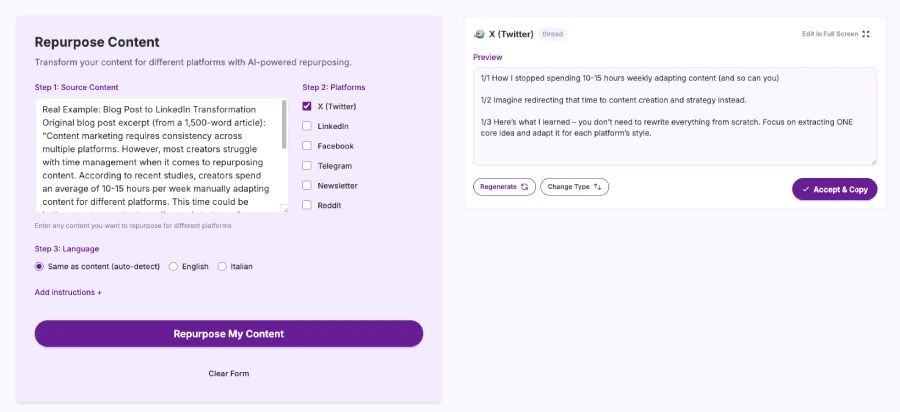
Most importantly, tools built for repurposing preserve your unique voice. You can train the model with reference content from each platform, ensuring outputs sound authentically like you, not generic AI content.
Common Repurposing Mistakes to Avoid
- Identical content across platforms: Copy-pasting the same text everywhere ignores platform culture.
- Over-automation without personalization: Even with tools, add your touch. Review outputs before posting.
- Repurposing low-quality content: Only amplify content worth spreading. One great piece beats five mediocre ones.
- Ignoring platform analytics: Pay attention to what formats and topics perform best on each platform.
- Forgetting to update references: Platform-specific CTAs perform better than generic ones.
Measuring Repurposing Success
Track these metrics to understand your repurposing ROI:
- Reach expansion: How many more people see your content across platforms?
- Engagement rates: Which platform versions generate the most comments, shares, or replies?
- Time saved: How many hours do you reclaim weekly?
- Conversion impact: Track newsletter signups, client inquiries, or sales from each channel.
Building Your Repurposing System
- Week 1: Manually repurpose one blog post for LinkedIn and X.
- Week 2: Add email to your repurposing mix.
- Week 3: Implement a repurposing tool to handle the heavy lifting.
- Week 4: Create templates, set posting schedules, and refine.
The Content Multiplier Effect
When you consistently repurpose content across platforms, something powerful happens. You're not just reaching more people - you're reinforcing your message through repetition and varying contexts.
Someone might scroll past your LinkedIn post but stop at your X thread. Another person ignores social media but opens every email. By being everywhere your audience is, you create multiple opportunities for your message to land.
Your Next 60 Seconds
You have two choices right now:
- Continue manually repurposing (or not repurposing at all), spending 10+ hours per week on reformatting while 85% of your potential audience never sees your best work.
- Transform your content workflow today. Paste your latest blog post, get platform-optimized versions in under 60 seconds, and start reaching everyone who needs to hear your message.
The content you've already created is sitting on the table, ready to multiply your reach. You just need to let it.
Ready to Stop Wasting 10+ Hours Per Week on Content Repurposing?
Your content deserves to reach more people. Your time deserves to be spent creating, not reformatting.
Start repurposing with RePurpose.ws →
✓ Transform any content into platform-ready posts in under 60 seconds
✓ Maintain your unique voice across all channels
✓ Support for LinkedIn, X, Email, Facebook, Reddit, Telegram, and more
✓ 14-day money-back guarantee - no questions asked
Write once. Post everywhere. Finally have time to create.
Posted by
 Di Reshtei