Key Takeaways
- X threads get 3x more engagement than single tweets, making them perfect for repurposing blog content
- Manual conversion takes 2-3 hours per post, but automated tools like RePurpose.ws can do it in under 60 seconds
- Thread structure matters: Start with a hook, break ideas into digestible chunks, and end with a strong CTA
- Tone adaptation is crucial: Blog content needs to be conversational and punchy for X's audience
- Strategic repurposing helps you reach the 85% of your audience who never visit your blog
Why Your Blog Posts Need to Live on X

You spent hours crafting that perfect blog post. The research was thorough, the writing was crisp, and the insights were valuable. But here's the hard truth: most of your audience will never read it.
Why? Because they're scrolling X, not your blog.
X (formerly Twitter) has over 500 million monthly active users who consume content in bite-sized, fast-paced formats. Meanwhile, your 2,000-word masterpiece sits on your website, reaching maybe 15% of your potential audience.
The solution? Turn that blog post into an engaging X thread that meets your audience where they already are.
The Anatomy of a High-Performing X Thread
Before we dive into the conversion process, let's understand what makes an X thread successful:
The Hook Tweet
Your first tweet needs to stop the scroll. It should promise value, spark curiosity, or present a bold statement. Think of it as your blog post's headline on steroids.
Example:
- Blog headline: "A Comprehensive Guide to Content Marketing Strategy"
- Thread hook: "I spent $50K on content marketing experiments. Here's what actually worked (and what was a complete waste of money) 🧵"
The Thread Structure
Each tweet should contain one complete idea. X threads work best when they:
- Keep tweets between 150-280 characters for easy reading
- Use numbered tweets (1/12, 2/12) to set expectations
- Include line breaks and emojis for visual breathing room
- Build momentum toward a conclusion or revelation
The Engagement Elements
High-performing threads include:
- Questions that prompt reflection
- Surprising statistics or facts
- Personal anecdotes or examples
- Visual breaks (emojis, spacing, formatting)
- A clear call-to-action at the end
The Closing Tweet
End with impact. This is where you drive home your main point, ask for engagement (likes, retweets, follows), or direct people to your full blog post for deeper insights.
The Manual Method: Step-by-Step
If you're doing this by hand, here's the process:
Step 1: Identify Your Core Message
Read through your blog post and extract the main thesis. What's the one big idea you want X readers to remember?
Step 2: Pull Out Key Points
Go through your blog and highlight 8-12 key points, statistics, or insights. Each of these will become a tweet in your thread.
Step 3: Craft Your Hook
Rewrite your blog introduction as a compelling hook tweet. Use pattern interrupts, curiosity gaps, or bold claims.
Step 4: Convert Paragraphs to Tweets
Transform each key point into a standalone tweet:
- Remove jargon and formal language
- Add conversational elements ("Here's the thing...", "But wait...")
- Break long sentences into shorter, punchier ones
- Include relevant emojis or formatting
Step 5: Add Engagement Triggers
Sprinkle questions, mini-cliffhangers, and engagement prompts throughout:
- "You might be thinking..."
- "Here's where it gets interesting..."
- "Let me explain..."
Step 6: Create Your CTA Tweet
End with a strong call-to-action:
- Link back to your full blog post
- Ask for a retweet if they found it valuable
- Invite replies with their thoughts
- Encourage following for more content
Step 7: Edit Ruthlessly
Go through each tweet and cut unnecessary words. X rewards conciseness.
The reality? This process takes 2-3 hours per blog post. If you're publishing consistently, that's 10-15 hours per week just on repurposing.
The Smart Way: Automated Repurposing
This is where tools like RePurpose.ws transform your workflow.
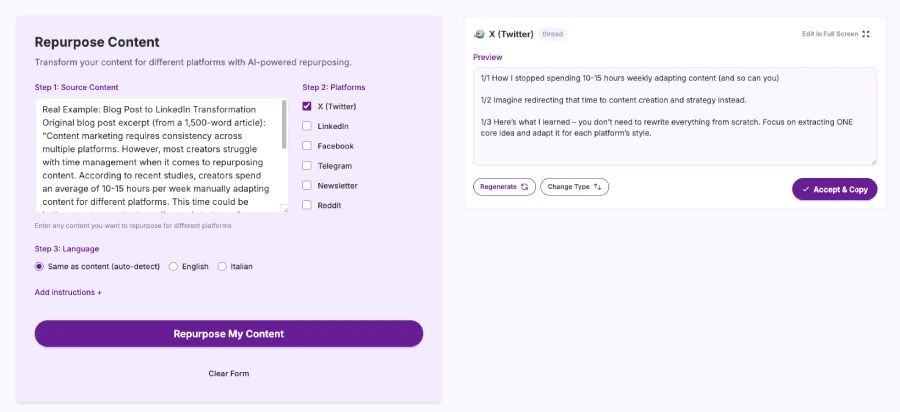
Instead of spending hours manually adapting your content, you can:
- Paste your blog post into the platform
- Select X/Twitter thread as your output format
- Get a platform-ready thread in under 60 seconds
The AI analyzes your content structure, identifies key points, adapts your tone for X's audience, and formats everything properly. Most importantly, it maintains your unique voice - it doesn't sound like generic AI content.
Voice Preservation
You can add reference content from your previous tweets or writing samples. The AI learns your style, vocabulary, and personality, then replicates it across all repurposed content.
Platform Optimization
The tool understands X's specific requirements:
- Proper character limits and spacing
- Engagement hooks and thread structure
- Hashtag and emoji placement
- Thread numbering conventions
Time Savings
What used to take 3 hours now takes 3 minutes. That's a 95% reduction in repurposing time, giving you back 10+ hours per week to focus on creating new content instead of reformatting old content.
X Thread Best Practices from Real Data
Based on analysis of high-performing threads:
Length Matters
- Threads with 8-12 tweets perform best
- Shorter threads (3-5 tweets) lack depth
- Longer threads (15+) see drop-off in engagement
Timing Is Everything
- Post when your audience is most active
- Weekday mornings (8-10 AM) typically perform well
- Test different times and track your analytics
Visual Elements Boost Engagement
- Tweets with emojis get 25% more engagement
- Line breaks improve readability by 40%
- Numbers and statistics stand out in the feed
The First Three Tweets Are Critical
- If someone doesn't engage by tweet 3, they won't finish
- Front-load your most compelling points
- Use pattern interrupts to maintain interest
Common Mistakes to Avoid
- Keeping the Blog Tone: Blog posts are often formal and detailed. X threads need to be conversational and punchy. Don't just copy-paste paragraphs.
- Overloading Each Tweet: One idea per tweet. If you're cramming multiple points into 280 characters, split it into two tweets.
- Forgetting the Hook: Your first tweet determines whether anyone reads the rest. A weak hook kills even the best content.
- No Call-to-Action: Don't end your thread with a whimper. Tell readers what to do next: read the full post, share the thread, follow you, or join the conversation.
- Ignoring Formatting: Walls of text don't work on X. Use line breaks, emojis, bold statements, and questions to break up content.
Advanced Strategies
Thread Templates
Create reusable structures for different content types:
How-to posts:
- Hook: Problem statement
- Promise: What they'll learn
- Steps: Numbered breakdown
- Common mistakes
- Final tips
- CTA: Link to full guide
List posts:
- Hook: Number + curiosity
- Setup: Why these matter
- Items: One per tweet with explanation
- Bonus item (overdeliver)
- Summary
- CTA: Engagement ask
Case study posts:
- Hook: Results preview
- Starting point
- The challenge
- The approach
- Key learnings
- Results
- CTA: Resources
Multi-Platform Strategy
Don't stop at X. Take that blog post and repurpose it for LinkedIn, newsletters, Reddit, Facebook, and Telegram.
With RePurpose.ws, you can generate optimized versions for all these platforms simultaneously from one blog post. One paste, multiple outputs, all maintaining your voice.
Measuring Success
Track these metrics to improve your threads:
Engagement Rate
- Likes, retweets, and replies relative to impressions
- Aim for 3-5% engagement rate minimum
- Top threads hit 10-15% engagement
Thread Completion Rate
- What percentage read to the end?
- Use X analytics to see where people drop off
- Refine your mid-thread content based on data
Click-Through Rate
- If you linked to your blog, how many clicked?
- A 2-5% CTR is solid for threads
- Test different CTA placements and wording
Follower Growth
- Did the thread bring new followers?
- Quality threads attract relevant audience
- Track follower quality, not just quantity
Content Repurposing Calendar
Create a sustainable system:
Week 1:
- Publish blog post
- Immediately create X thread
- Schedule thread for optimal time
- Cross-post to LinkedIn
Week 2:
- Repurpose into newsletter segment
- Create Reddit discussion post
- Share thread highlights on Facebook
Week 3:
- Pull quotes for standalone tweets
- Create visual quotes from thread
- Engage with thread replies
Week 4:
- Analyze performance
- Identify top-performing tweets
- Plan next month's content
The Bottom Line
Your blog posts contain valuable insights that deserve a wider audience. X threads are one of the most effective ways to extend your reach, drive engagement, and bring traffic back to your full content.
The choice is simple: spend hours manually reformatting each post, or use tools like RePurpose.ws to do it in seconds while maintaining your unique voice.
Remember, 85% of your audience won't read your blog. But they will scroll X. Meet them where they are.
Ready to Stop Wasting 10+ Hours Per Week on Content Repurposing?
Your blog posts shouldn't die after you hit publish. They should reach every corner of your audience - X, LinkedIn, newsletters, Reddit, Facebook, and beyond.
Try RePurpose.ws now and transform any blog post into platform-ready content in under 60 seconds. Paste your content, select your platforms, and get optimized posts that sound like you, not generic AI.
- ✓ 25+ optimizations per month on the Starter plan
- ✓ All platforms supported (X, LinkedIn, newsletters, and more)
- ✓ Your voice preserved with custom reference content
- ✓ 14-day money-back guarantee - no questions asked
Start Repurposing → https://repurpose.ws
Write once. Post everywhere. Finally have time to create instead of reformatting.
Posted by
 Di Reshtei