Key Takeaways
- LinkedIn posts require 50-70% less content than blog posts, focusing on one core message
- The hook matters most: Your first 2-3 lines determine if people click "see more"
- Format for scanability: Short paragraphs, line breaks, and emojis boost engagement
- Professional tone beats casual: LinkedIn audiences expect polished, value-driven content
- Timing is everything: Tuesday through Thursday between 8-10 AM gets the most visibility
- Automation saves 10+ hours weekly: Tools like RePurpose.ws can transform your blog into LinkedIn posts in under 60 seconds
You've spent hours crafting the perfect blog post. It's insightful, well-researched, and packed with value. But here's the problem: most of your audience won't see it.
Why? Because they're scrolling LinkedIn, not your blog.
The good news? You don't need to write everything from scratch. You can repurpose your blog content into high-performing LinkedIn posts. Here's exactly how to do it.

Why LinkedIn Posts Are Different From Blog Posts
Before we dive into the how-to, let's understand what makes LinkedIn unique:
- Blog posts are comprehensive, SEO-optimized, and designed for deep dives. They live on your website and attract organic traffic over time.
- LinkedIn posts are social-first, conversation-starters designed for quick consumption. They need to stop the scroll, deliver value fast, and spark engagement in seconds.
Your blog post might be 2,000 words. Your LinkedIn post? Aim for 150-300 words max (though LinkedIn allows up to 3,000 characters).
Step 1: Identify Your Core Message
Don't try to cram your entire blog post into LinkedIn. Instead, extract one powerful idea.
Ask yourself:
- What's the single most valuable insight from this blog post?
- Which point would spark the most discussion?
- What problem does this solve for my audience?
Example: If your blog post is "10 Ways to Improve Email Marketing," your LinkedIn post might focus on just one technique: "Why your email open rates are suffering (and the one-line fix)."
Step 2: Write a Hook That Stops the Scroll
LinkedIn users scroll fast. Your first 2-3 lines need to grab attention immediately, because that's all they see before the "see more" button appears.
Weak hook: "Email marketing is an important part of any business strategy."
Strong hook: "I increased email open rates by 47% with one simple change. Here's what I did."
Hook formulas that work:
- Start with a bold statement or controversial opinion
- Lead with a surprising statistic or result
- Ask a provocative question
- Share a relatable pain point
Step 3: Restructure for Readability
LinkedIn posts need to be scannable. Break up your content with:
- Short paragraphs: 1-3 lines max per paragraph
- Line breaks: White space makes content easier to digest
- Bullet points or numbered lists: Perfect for quick takeaways
- Emojis (used sparingly): They add visual breaks and personality
Compare these two formats:
Before (blog style): "Email personalization is crucial for improving engagement rates. Studies show that personalized subject lines increase open rates by an average of 26%. Additionally, segmented campaigns drive 30% more opens and 50% more clickthroughs than non-segmented campaigns."
After (LinkedIn style): "Want higher email open rates?
Try this:
- ✅ Personalize your subject lines (+26% opens)
- ✅ Segment your audience (+30% opens, +50% clicks)
- ✅ Test send times for your niche
I did this last month and saw a 47% increase.
The best part? It took less than an hour to set up."
Step 4: Add Your Unique Perspective
LinkedIn rewards authenticity. Don't just share information - share YOUR experience with it.
What did you learn from implementing this?
What mistakes did you make?
What surprised you about the results?
Personal stories and behind-the-scenes insights make your content memorable and build trust with your audience.
Step 5: Include a Clear Call-to-Action
What do you want readers to do after reading your post?
- Comment with their experience
- Share if they found it valuable
- Check out your full blog post (include the link)
- Connect with you for more insights
Example CTAs:
- "What's your biggest email marketing challenge? Drop it in the comments."
- "Read the full breakdown with examples: [link]"
- "Agree? Hit the repost button to share with your network."
Step 6: Optimize Your Formatting
Before you hit publish, check these formatting elements:
- Hashtags: Use 3-5 relevant hashtags at the end of your post (e.g., #EmailMarketing #DigitalMarketing #MarketingTips)
- Mentions: Tag people or companies you reference to increase visibility
- Line breaks: Ensure proper spacing for mobile readability
- Link placement: If including a blog link, put it in the first comment to avoid reducing organic reach (LinkedIn's algorithm sometimes deprioritizes posts with external links)
Step 7: The Fast Way - Use Automation
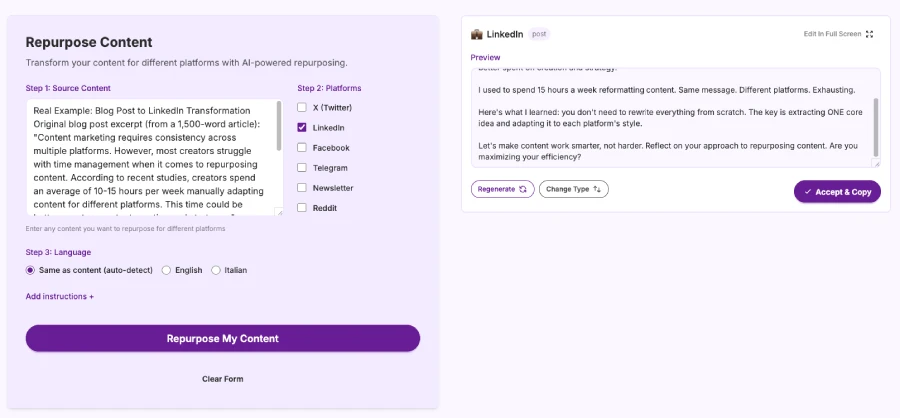
Let's be honest: manually repurposing content for every platform is exhausting. You're spending 3-4 hours adapting one blog post for LinkedIn, Twitter, newsletters, and more.
This is where RePurpose.ws changes the game.
Here's how it works:
- Paste your blog post into the platform
- Select LinkedIn as your target platform
- Get a perfectly formatted LinkedIn post in under 60 seconds
The AI analyzes your content, extracts the core message, and transforms it into a LinkedIn-optimized post while maintaining your unique voice and tone. No generic AI fluff - just authentic content that sounds like you.
The best part? You're not locked into one format. You can regenerate different versions, adjust the tone, or manually edit any part. Think of it as your personal content assistant that saves you 95% of the repurposing time.
With RePurpose.ws, you can also transform the same blog post into:
- Twitter threads
- Newsletter content
- Facebook posts
- Reddit discussions
- Telegram messages
All in one go. All maintaining your voice.
Real Example: Blog Post to LinkedIn Transformation
Original blog post excerpt (from a 1,500-word article): "Content marketing requires consistency across multiple platforms. However, most creators struggle with time management when it comes to repurposing content. According to recent studies, creators spend an average of 10-15 hours per week manually adapting content for different platforms. This time could be better spent on content creation and strategy..."
LinkedIn post version: "I was spending 15 hours/week reformatting content.
Same message. Different platforms. Exhausting.
Here's what I learned:
- You don't need to rewrite everything from scratch.
- The key is extracting ONE core idea and adapting it to each platform's style.
For LinkedIn: Professional tone, clear value, conversation-starter
For Twitter: Punchy, thread-worthy, engaging hooks
For newsletters: Detailed, narrative-driven, personal
I started using RePurpose.ws to automate this process.
Result?
- 95% less time on repurposing
- 3x more platforms covered
- Consistent voice everywhere
Now I spend those 15 hours creating new content instead.
What's your biggest content repurposing challenge? 👇"
Common Mistakes to Avoid
- Copying and pasting your blog post: LinkedIn isn't a blog platform. Adapt your content.
- Being too promotional: Lead with value first, then mention your product/service.
- Ignoring the algorithm: LinkedIn rewards posts that spark conversations. Ask questions, encourage comments.
- Inconsistent posting: Sporadic posting hurts your reach. Aim for 3-5 times per week.
- Not engaging with comments: Reply to every comment within the first hour to boost algorithmic visibility.
The Bottom Line
Turning a blog post into a LinkedIn post isn't about making it shorter - it's about making it social.
Extract your best insight, lead with a strong hook, format for scanability, and add your unique perspective. Do this manually, or save 10+ hours per week by automating the process.
Your blog content is too valuable to live in just one place. Get it in front of your LinkedIn audience where they're already scrolling.
Ready to Stop Wasting Time on Content Repurposing?
If you're tired of spending hours manually adapting your blog posts for every platform, RePurpose.ws can help.
Here's what you get:
- Transform any blog post into platform-ready content in under 60 seconds
- Maintain your unique voice and tone across all platforms
- Support for LinkedIn, Twitter, Facebook, Reddit, Telegram, newsletters, and more
- 95% reduction in repurposing time
Try it now: Paste your content, select your platforms, and get optimized versions instantly.
👉 Start Repurposing Your Content Now
14-day money-back guarantee. No questions asked.
Save time. Reach more people. Let your content work harder for you.
Posted by
 Di Reshtei